
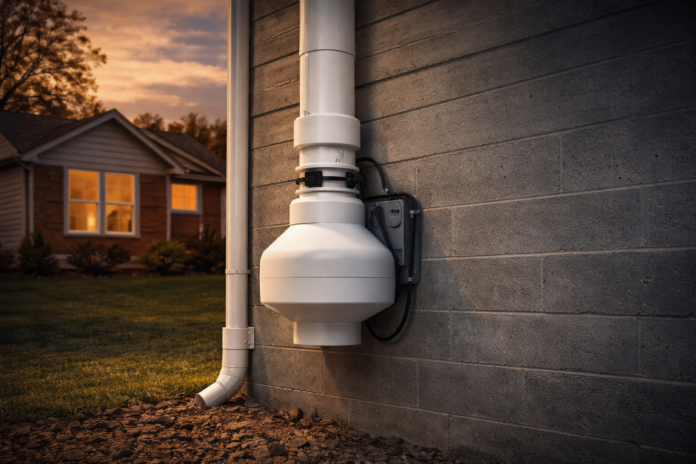
How Loud Is a Radon Fan? Noise Expectations and Fixes
A radon mitigation fan is designed to run 24/7, often for years, without calling attention to itself. Most of the time it does. But when homeowners notice it, it is usually because something changed: the fan got louder, the noise moved indoors, the exhaust started “whooshing,” or the fan developed a high-pitched whine.
This guide explains what “normal” radon fan noise sounds like, what noise patterns often signal a problem, and the practical fixes that actually help. It is written for homeowners with an existing radon mitigation system who want a clear way to diagnose noise without guessing.
Table of Contents
- What normal radon fan noise sounds like
- How loud is “normal” (decibel expectations)
- Inside noise vs outside noise
- Noise types and what they usually mean
- Quick checks you can do safely
- Fixes that actually work (from easiest to most involved)
- When noise means you should replace the fan
- After you fix noise: how to confirm you did not hurt performance
- FAQs
- Sources
What normal radon fan noise sounds like
Most properly installed radon fans produce a steady, low hum or soft whir that fades into the background. Many homeowners only notice the fan if they stand near it outside, or if they are in the closest interior area near where the pipe passes through a wall.
A normal system should not sound like a struggling appliance. You should not hear grinding, rattling, squealing, or a sharp whine. Those are the sounds that usually point to a mechanical issue, vibration transfer, or airflow turbulence.
Also keep expectations realistic. A radon fan is still a fan. It moves air continuously. Even a “quiet” system may be faintly audible in very quiet rooms, especially if the fan is mounted near a bedroom wall or above a patio.
How loud is “normal” (decibel expectations)
It is hard to give one universal decibel number because noise depends heavily on installation. Fan location, pipe routing, couplers, mounting, wall construction, and the exhaust termination can make the same fan seem quiet in one home and annoying in another.
With that said, some common radon fan models are listed around the 50 dB range at the fan itself. For example, a product listing for a RadonAway RP145C shows a Noise Level: 50 dB in its specs. This does not mean your bedroom will be 50 dB. It is a reference point for the fan unit, not a guarantee of what you will hear indoors. The indoor experience often depends more on vibration transfer and exhaust placement than on the raw fan spec.
What most homeowners actually want to know is this: should you be able to hear it inside? If the fan is mounted correctly and isolated from the framing, many homes only have a faint hum in nearby utility areas, if anything. If you can clearly hear it in living areas or bedrooms, it is worth troubleshooting.
Inside noise vs outside noise
Radon noise complaints usually fall into two categories: noise you hear inside the home and noise you hear outside near the discharge point.
Inside noise is usually caused by vibration traveling through the pipe into the home’s framing. If the fan is mounted against a wall, if the couplers are too rigid, or if pipe straps are transferring vibration into studs, the fan’s hum can become a “whole wall” vibration that is much louder indoors than it should be.
Outside noise is often airflow noise, especially at the exhaust termination. High airflow, turbulence, or an exhaust point that is too close to a porch or patio can create an annoying “whoosh” or “jet” sound outdoors.
There is also a third scenario: the fan itself is failing and producing a high-pitched whine. That noise can be heard both inside and outside and tends to get worse.
Noise types and what they usually mean
Use this section like a translator. Match the sound to the likely cause, then skip to the fix section.
| Noise type | What it usually sounds like | Most common cause | What to do first |
|---|---|---|---|
| Low hum | Steady “background” motor hum | Normal operation, or mild vibration transfer | Check if noise is new or unchanged. If new, inspect couplers and mounting. |
| Rattle | Intermittent clatter or tapping | Loose mounting hardware, pipe contact with wall/studs, loose strap | Look for physical contact points and loosen/tighten straps appropriately. |
| Buzz / vibration in wall | Wall or floor “resonates” | Vibration transferring into framing | Improve isolation: couplers, mounting, pipe straps, spacing from wall. |
| Whoosh / jet | Loud airflow sound at exhaust | Turbulence, high airflow, exhaust too close to where people sit | Consider a muffler/noise suppressor and evaluate exhaust placement. |
| High-pitched whine | Sharp tone, often constant | Fan bearings wearing out | Plan fan replacement soon. Do not ignore it. |
| Grinding | Harsh mechanical friction sound | Bearing failure or internal damage | Replace the fan promptly. Confirm system performance afterward. |
| Gurgling | Water sound, often after rain | Condensation or water management issues in piping | Call a professional to evaluate drainage, slope, and freeze risk. |
Quick checks you can do safely
Before you buy parts or schedule major changes, do these basic checks. They often solve the mystery quickly.
Safety first: Do not open electrical boxes or fan housings unless you are qualified. For most homeowners, the safe checks are visual, listening-based, and indicator-based.
1) Confirm the fan location makes sense
A radon fan should be located in an unconditioned space like an attic, garage, or outside the home. This is commonly done to prevent radon from leaking back into the home and it also helps reduce noise inside living spaces. If your fan is mounted in a questionable location near a bedroom wall or in a finished area, noise issues become more likely.
2) Look for pipe contact points
Many noise problems are not “fan problems.” They are “fan vibration is touching something” problems. Look for:
- Fan housing touching siding, sheathing, or framing
- PVC pipe strapped too tightly to studs
- Pipe rubbing against a hole through the rim joist or wall
3) Check your manometer and warning devices
Noise complaints sometimes happen at the same time the system stops working correctly. If you have a U-tube manometer (the common “bubble gauge”), make sure it shows the expected pressure difference. If it suddenly reads “zero” or looks very different than the baseline sticker, treat that as a reason to call for service.
4) Notice whether the noise is inside-only or outside-only
This is the fastest way to narrow the cause:
- If it is loud inside but not outside, think vibration transfer.
- If it is loud outside near the exhaust, think airflow noise.
- If it is loud everywhere and high-pitched, think bearings.
Fixes that actually work (from easiest to most involved)
Fix 1: Add vibration isolation where the fan connects to pipe
If the problem is indoor vibration, improving isolation is often the biggest win.
One common approach is using softer, vibration-isolating couplers designed for radon systems. For example, Fantech LDVI couplers are specifically marketed for low durometer vibration isolation and noise/vibration reduction. If your system uses rigid couplings or if the fan is effectively “hard-coupled” to the pipe and framing, upgrading isolation can noticeably reduce indoor hum.
Important: Couplers do not fix bearing noise. If the fan itself is whining, isolate all you want, it will still whine.
Fix 2: Reduce vibration transfer through the house
If you can hear the fan through a bedroom wall, the issue is often the wall acting like a speaker. Fixes that can help:
- Ensure the fan housing is not touching the house wall or siding
- Reposition pipe straps so the pipe is supported but not tightly pressed into studs
- Add spacing where pipe passes through wood (avoid pipe rubbing on framing)
These fixes are simple conceptually: remove direct contact points so vibration has less path into the structure.
Fix 3: Address exhaust airflow noise with a muffler or noise suppressor
If the complaint is a loud “whoosh” outside near the discharge, an in-line muffler can help. Some mufflers are foam-lined to reduce airflow noise. RadonAway sells an in-line PVC muffler that is described as foam lined for reducing airflow noise.
Placement matters. A muffler can be installed in-line (in the vertical run) or near the termination depending on the design. A qualified mitigator can tell you what will reduce noise without compromising performance.
Fix 4: Check for turbulence and bad termination placement
Even a good fan can sound loud if the exhaust terminates in a bad place. Common mistakes include:
- Exhaust terminating near a deck, patio, or window where people spend time
- Termination setup that creates turbulence (sharp turns, poor transitions)
Sometimes the best “noise fix” is moving the termination or redesigning the last section of piping to reduce turbulence and shift the sound away from where people sit. This is usually a job for a professional because you want to maintain safe discharge location and system performance.
Fix 5: Replace the fan when the noise is a mechanical failure signal
Some noises are warnings, not inconveniences. If your fan develops a high-pitched whine, grinding, or rattling that sounds like internal wear, replacement is often the correct move. Fans run continuously, so they do wear out. EPA notes that fans may last five years or more, warranties tend not to exceed five years, and replacement is a normal maintenance event. EPA also notes replacement cost commonly runs around $200 to $350 including parts and labor and recommends retesting periodically to ensure radon stays low.
When noise means you should replace the fan
Here is a practical rule: if the noise is new and getting worse, treat it as a potential failure indicator.
Replace or service the fan promptly if:
- The noise becomes high-pitched, sharp, or “screechy”
- The noise sounds like grinding or metal friction
- The fan gets louder over weeks
- The system pressure indicator changes dramatically at the same time
In many cases, the cost of replacement is lower than the cost of living with it, and it protects you from a complete failure that might allow radon levels to rise again.
After you fix noise: how to confirm you did not hurt performance
Any change that affects airflow (especially mufflers, termination changes, or fan swaps) should be followed by a basic performance check.
Use this sequence:
- Confirm the manometer shows normal suction compared to baseline.
- Confirm any alarm or notification device is functioning.
- Retest radon after changes, especially after fan replacement or airflow modifications. EPA recommends periodic retesting to ensure levels remain low.
The goal is quiet and effective. Quiet without effective is not a win.
FAQs
Should I be able to hear my radon fan inside the house?
Often you may hear a faint hum in the closest utility area, but you should not hear strong vibration through walls or floors. If you do, it is usually a vibration transfer issue or a failing fan.
Is a louder radon fan “stronger” or “better”?
Not necessarily. Loudness can come from vibration transfer, turbulence, oversizing, or failing bearings. A properly selected fan can be effective and still quiet.
Will a muffler reduce radon system performance?
A muffler is designed to reduce noise, but any change in piping can affect airflow characteristics. This is why you should confirm the system indicators after installation and retest radon levels.
Can I turn the radon fan off at night to stop the noise?
Radon fans are intended to run continuously. Turning them off increases radon risk and can accelerate maintenance issues depending on conditions. If noise is bothersome, address the cause rather than cycling the fan.
My fan is quiet but I hear air noise at the roofline. Is that normal?
It can be. Airflow at the termination may be audible, especially near porches or outdoor seating. A muffler or termination adjustment often helps.
Sources
- Northern Tool: RadonAway RP145C specs (includes noise level listing)
- Minnesota Department of Health: Radon mitigation system components (fan placement guidance)
- Fantech: LDVI anti-vibration couplers (noise and vibration isolation)
- EPA: How to know if a radon mitigation system is working (maintenance, fan lifespan, retesting guidance)
- RadonAway: In-line PVC muffler (foam-lined for airflow noise reduction)